Showing posts with label Technology. Show all posts

Confusing Emoji: Emojis that we think it in a wrong meaning.

We use so many Emoji while chatting online. Here are 21 emojis we often make mistake.

Let's have a look...
   

This is not nuts, it's Sweet Potato
This is not a hip of Ping Pong Balls, it's for Moon Festival!

This is not Oak fruit, you're looking at Chestnut

Do not send it as a gift card, actually it is Bookmark emoji

Send it to mean All Is Well, it means Everything's fine

Use this Emoji to celebrate anything. 

Are you so angry, or disturbed? This one is for you. It doesn't mean anything Ugly.

This emoji represents the holy place of Islam. It is not a good practice using it for other reason.

No, there is nothing wrong to her head. It means, someone is massaging her face or head.

So many people use this emoji to mean Shout, but it means Information Desk Staff.

Don't be afraid. It doesn't mean someone is going to slap you. It means your hands are free to hug! How sweet, isn't it?

The man of this emoji is not waiting for something, not even thinking of anything. He just put his head down.

Use this emoji to tell that you are silent, when you really are. Though often we use it to mean confusion or anger. 

The name of this emoji is Badge, even though it looks like fire.

It doesn't even related to construct or any game or anything else. It means expressing anger!

It is the symbol of a special kind of glass. Do not get confused to mean hard drink. 

This one is not for crying or normal smile. It means too much laugh what made you rolling on the floor.

It is not to mean parachute or playing card. Use it to mean chime of apple air.

You shouldn't use it for siren. People often use the truck ball instead of mouse.  

Do not think too much. It's just a whole.

And this emoji is to represent Musician, are you?


Pokemon Go is making noise worldwide while costing lives at risk


It seems to make people so much addicted as they even forget the present! Even now we see notice in many countries warning people Not to Play Pokemon Go while driving or doing something.

Within a very short time Pokemon Go made a huge crowd which means a lot of money for the franchise's owners. But those who are not even close to any video game ever, are being bothered sometime.

A lady uploaded a video in Youtube sharing her bad experience of being bothered by Pokemon Go players around her place. Click here to see the video on Youtube.

Darwin police had to issue the very first statement warning players right after Pokemon Go first release in Australia.

Ohh.. Wow..!
There is a good news too.

Fine Gael senator Catherine Noone thinks that the Government should give money on the next budget for apps like Pokemon Go to handle country's obesity problem.


“Pokémon Go seems to motivate young people, even those who have not been active for some time,” said Ms Noone.

“Ireland is on course to become one of the fattest nations in the world by 2030,” noted Ms Noone.

“I hope the Government is quite forward thinking when it comes to something like this in the upcoming budget,” said Ms Noone.

Google Phone! Google is challenging iphone


Tech giant Google is heading to challenge Apple and the iPhone by releasing its own phone by 2016.
They are currently negotiating with mobile operators worldwide focusing releasing its own device later this year.


Encouraged by recent Nexus model 5x & 6p, though these were built in collaboration with Huawei, LG & HTC; Google will keep partnering manufacturing with other companies.
See supper hot Huawei Nexus 6p


Best E-Book reader

Amazon bought Kindle, the supper cool gadget for those who wants to read more than anything else. Passionate readers get comfort of reading anywhere & everywhere.

Click on the image below to get more details of Kindle!

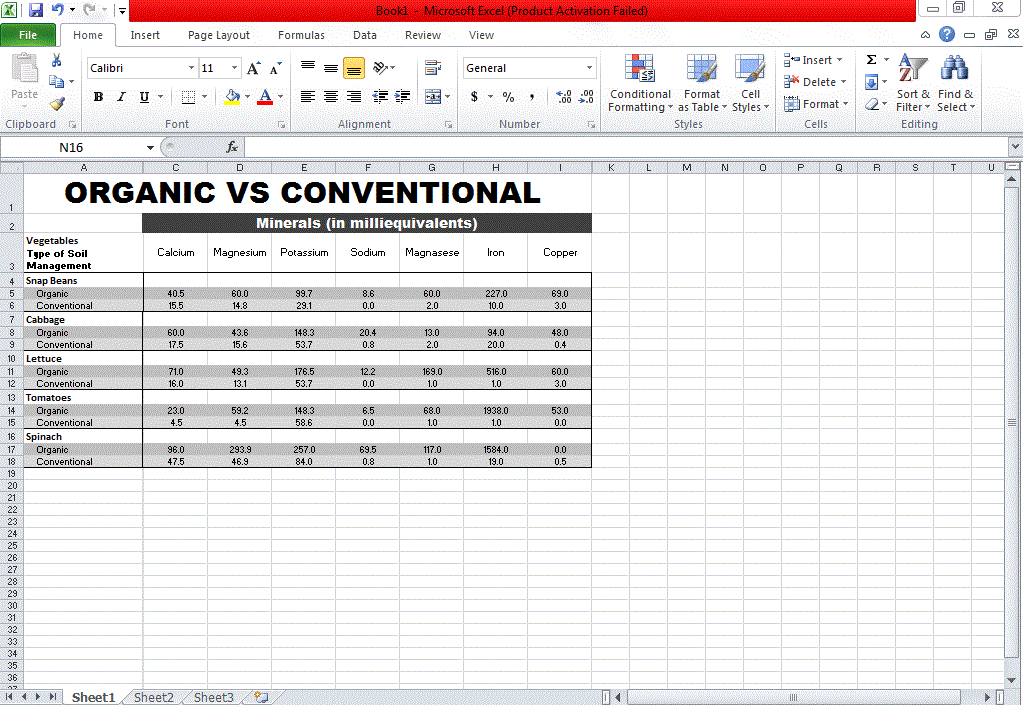
How to make Graph in Microsoft Excel, 2010

Step 1:
Input all your data in Excel Sheet.
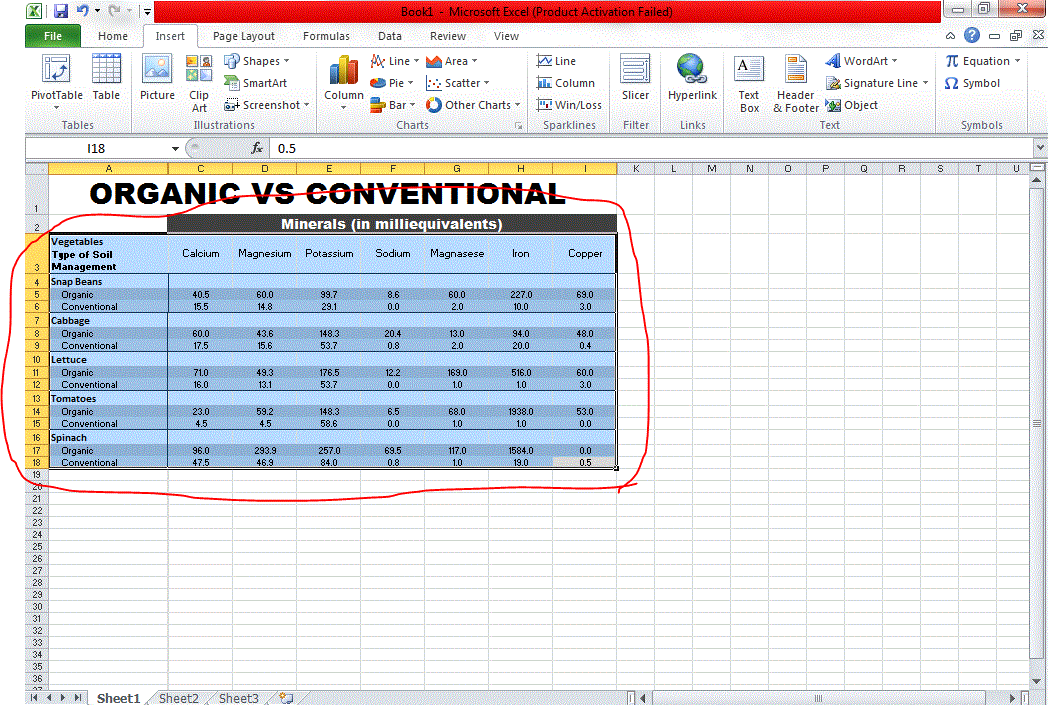
Step 2:
Select the data area with which you want to make Graph.
Step 3:
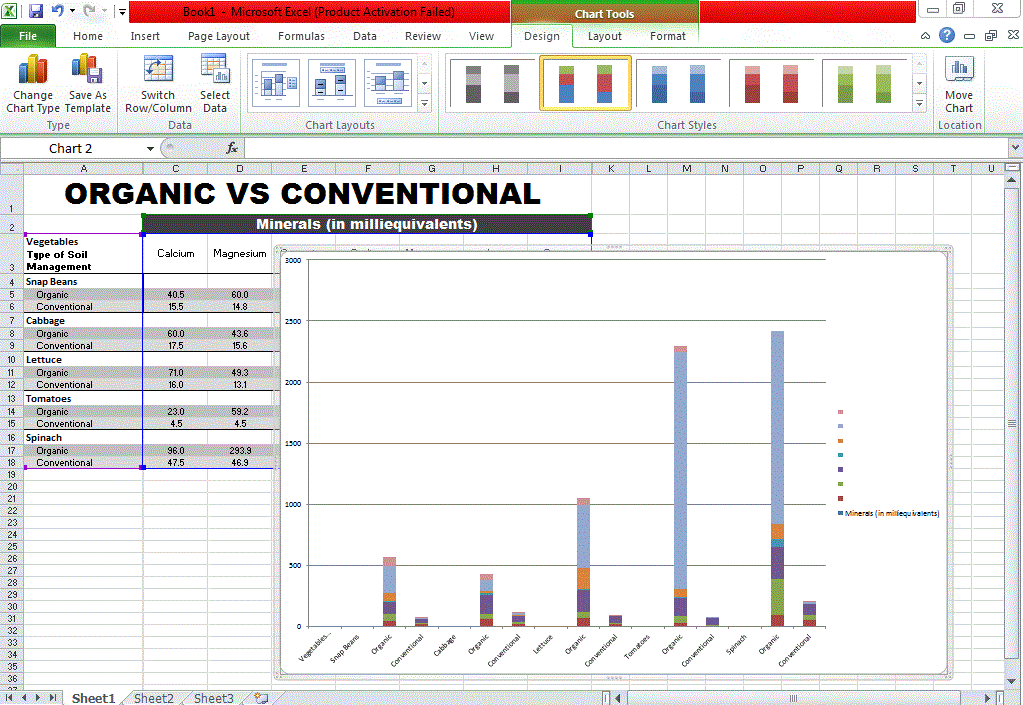
Click on Insert tab. Now chose what type of graph you want to make Column, Line, pie or Bar.
Now you will get your Graph ready.


Step 4:
Click on the border of the graph and copy it.
Step 5:
Open Paint and paste it over there.
Step 6:
Now click on the arrow you see on the selected red circle. Than click Save as. Now select the folder on your Computer. Name the file and click Save.

It's Done!!!


Download Photoshop basic tutorial in pdf